Featured

Getting salty with SaltStack

In this blog, I will try my best to simplify SaltStack, what is it, and why now?

VMware acquired SaltStack in October 2020 in the thick of the global pandemic.

This got me thinking, why did they acquire Salt?

Don’t they have enough automation tools?

Please watch the following video to get you started 👍

Thanks for watching the doodle!!!, let’s get into some details

End-to-End full stack automation is critical for a digital business

Doing point and disparate automation and using multiple tools is a thing of the past and doesn’t work for a digital business

Look at the role RPA (robotic process automation ) plays in today’s business – the more a company automates its process, the better the gains.

In the same lines, full-stack automation in IT is a critical need

This pandemic has made many of our customers realize this.

 They can’t be talking to multiple teams (storage/compute/network/security) to get a VM with OS and DB installed and ready to go

Most customers have one tool to automate infrastructure and one to automate application deployment, and another to automate networking

VMware acquiring Salt is a brilliant move to bring some method to the chaos.

VMware vRealize Automation SaltStack Config brings the following value to the table

  • Quickly and easily deploy and configure software across virtualized, hybrid, and public cloud environments
  • Security and performance – hosts can now detect configurations drifts and auto remediate at scale
  • Implement change immediately at a massive scale across the IT stack.

Following are some SaltStack use cases

  • Configuration management
  • Compliance and secure configuration enforcement
  • Software deployment and updates
  • Patching and orchestrated OS app maintenance
  • Self-service infrastructure automation

SaltStack Basic building blocks

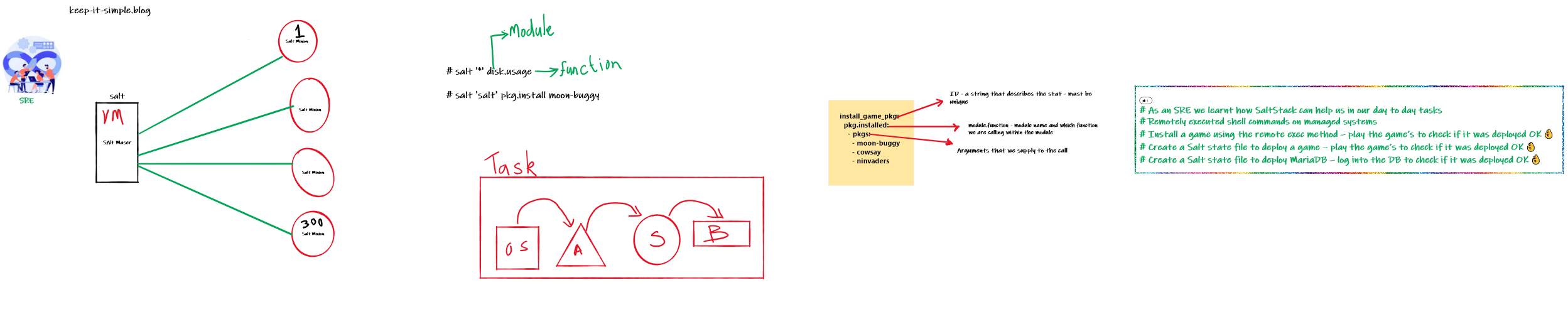
  • Salt is a simple client/server architecture
  • The Salt Master and the Salt Minion
    • Salt Master is a process that manages the salt infrastructure and dictates policies
    • Salt Minions are the slave process installed on all managed hosts
  • The job of a minion is to execute the instructions sent by the Salt Master, report job success, and provide data related to the underlying host
  • Some Important SaltStack jargons , just FYI… We will learn as you progress
    • Master – the central management system.
    • Minions – a managed system
    • States – What you use to determine the State of a machine, there are many states you can have – state of the a machine is the configuration a list of instructions on what Salt should to a minion
    • Modules – Salt comes with built-in modules to install software, copy files, check services, and other tasks you want to automate

That’s all we need to know as of now…

Salt…. The essence of life

Let us learn Salt the practical way and do not get bogged down with technical content you don’t understand;  Work with me on the story

Hands-on Task’s

  • Download the OVF from – https://bit.ly/31iDF6I
  • Import it into your VMWare workstation or player environment – instructions in the video
  • VMware Workstation Player is free for personal, non-commercial use – download
  • For credentials pls send me an email – roshan@keep-it-simple.blog
  • Run some initial check to see Salt is installed and working
  • Assume you are an SRE in your favorite company and perform the following automation activities
    • Remotely execute shell commands on managed systems
    • Install a game using the remote exec method – play the game’s to check if it was deployed 👌
    • Create a Salt state file to deploy a game – play the game’s to check if it was deployed 👌
    • Create a Salt state file to deploy MariaDB – log into the DB to check if it was deployed 👌 
The CowSay's
 _______________________________________
/ Keep IT simple- Humans respond to and \
| process visual data better than any   |
\ other type of data                    /
 ---------------------------------------
        \   ^__^
         \  (oo)\_______
            (__)\       )\/\
                ||----w |
                ||     ||

Hence another video to help you with your exercise 
Salt Lab – for credentials pls send me an email – roshan@keep-it-simple.blog

Whiteboard

Leveraging a Data Lakehouse for Large Language Model (LLM) Development and Training

Dell Technologies recently unveiled the Dell Data Lakehouse, and I’ve received numerous inquiries about its use cases and how it can benefit our customers. In this post, I’ll explain how the Dell Data Lakehouse can serve as the foundation data repository for your LLM development.

It’s important to note that a Data Lakehouse is a data storage and management solution that merges the “best” features of a data lake and a data warehouse.

Here are some of its applications

  • Big Data Applications Support: The data Lakehouse is engineered to store and process vast volumes of data, making it an ideal fit for big data applications.
  • Batch and Real-Time Data Processing: The data Lakehouse can support both batch and real-time data processing, enabling organizations to analyze data as it is generated.
  • Integration with Diverse Data Sources: The data Lakehouse can store the ingestion of data from various sources, including structured, semi-structured, and unstructured data.
  • Support for SQL and Other Query Languages: The data Lakehouse supports SQL and other query languages, simplifying the process for analysts and data scientists to work with the data.
  • Create a Single Source of Truth: A data Lakehouse can help establish a single source of truth, eliminate redundant costs, and ensure data freshness, and the data engineering teams will be able to reduce the time and effort it takes to uncover
    impactful insights through democratized access to data
  • Support for AI, BI, ML, and Data Engineering: Data Lakehouse merges the capabilities of data warehouses and data lakes, aiming to support AI, BI, ML, and data engineering on a single platform.

Leveraging a Data Lakehouse house for storing and processing data used in Large Language Model (LLM)   training and fine-tuning. 

Let’s explore the steps involved: 

1.   Data Lakehouse Setup:

   –   Create a Data Lakehouse:

  • Dell Technologies has made it easy for you – buy the outcome – Buy Dell Data Lakehouse as a turnkey solution
    • It comprises the Dell Data Analytics Engine, a powerful federated and data lake query engine powered by Starburst, Dell Lakehouse System Software that provides lifecycle management and tailor-made compute hardware, all integrated into one

   –   Organize Folders:

  • Organize your data within the data Lakehouse by creating folders or directories.
  • For LLM data, consider creating separate folders for raw text data, pre-processed data, and fine-tuned model checkpoints.

2.   Data Ingestion:

   –   Ingest Raw Data:

  • Upload raw text data (such as Wikipedia articles, news articles, or domain-specific content) into the data Lakehouse. This data will serve as the foundation for pre-training your LLM.

   –   Metadata and Cataloging:

  • Add metadata (e.g., creation date, source, author) to each dataset. Use tools like dbt, Informatica, Qlik, etc., and index the data for efficient querying.

3.   Preprocessing and Feature Engineering:

  • Data Transformation: Preprocess the raw data by tokenizing, cleaning, and encoding it into suitable formats (e.g., tokenized sequences, embeddings).
  • Feature Extraction: Extract relevant features (e.g., word embeddings, contextual embeddings) from the text data. Store these processed features in the data Lakehouse.

4.   Version Control and Lineage:

  • Versioning: Maintain different versions of your processed data. Use version control tools (e.g., Git ) to track changes and manage data lineage.
  • Data Provenance: Document the lineage of each dataset, including its origin, transformations, and usage. This helps ensure the data quality and explainability of AI.

5.   Fine-Tuning Data:

  • Domain-Specific Data: Collect domain-specific data relevant to your LLM’s intended use case (e.g., medical texts, legal documents, customer service interactions).
  • Fine-Tuning Datasets: Create datasets with input-output pairs (e.g., user queries and chatbot responses) for fine-tuning. Store these datasets in the data   Lakehouse.

6.   Model Training and Checkpoints:

  • Training Data: Use the preprocessed data from the data Lakehouse for pre-training the LLM. Train the model on powerful compute resources (e.g., GPUs, TPUs).
  • Checkpoint Storage: Save intermediate model checkpoints during training. Store these checkpoints in the data   Lakehouse for later fine-tuning.

7.   Fine-Tuning Process:

  • Fine-Tuning Datasets: Retrieve the fine-tuning datasets from the data   Lakehouse.
  • Fine-tune the Model: Fine-tune the pre-trained LLM using the domain-specific data. Monitor performance and adjust hyperparameters as needed.
  • Save Fine-Tuned Model: Store the fine-tuned LLM checkpoints back in the data Lakehouse.

8.   Data Access and Security:

  • Access Control: Set up access controls and permissions for data   Lakehouse resources. Limit access to authorized users.
  • Encryption: Encrypt data at rest and in transit (ECS Object storage encryption) to ensure security.

9.   Scalability and Cost Optimization:

  • Partitioning: Partition large datasets within the data Lakehouse to optimize query performance.
  • Cost Monitoring: Monitor storage costs and optimize storage tiers based on data access patterns.

10.   Data Governance and Compliance:

  • Data Policies: Define data governance policies, including retention periods, data deletion, and regulation compliance (e.g., GDPR).
  • Auditing and Monitoring: Implement auditing and monitoring mechanisms to track data   Lakehouse usage.

Following is a simple whiteboard story for those who don’t want to get into the weeds – How to leverage Dell Data Lakehouse for AI

You would have heard about the Dell AI Factory – The Dell Data Lakehouse is the factory’s foundation that serves data which is the fuel for your AI initiatives.